
Run every job, technician and island from one screen.
Korenta Field is field service management made for multi-island operations: scheduling, follow-up visits, invoicing and QuickBooks export, in the currency you already bill in.
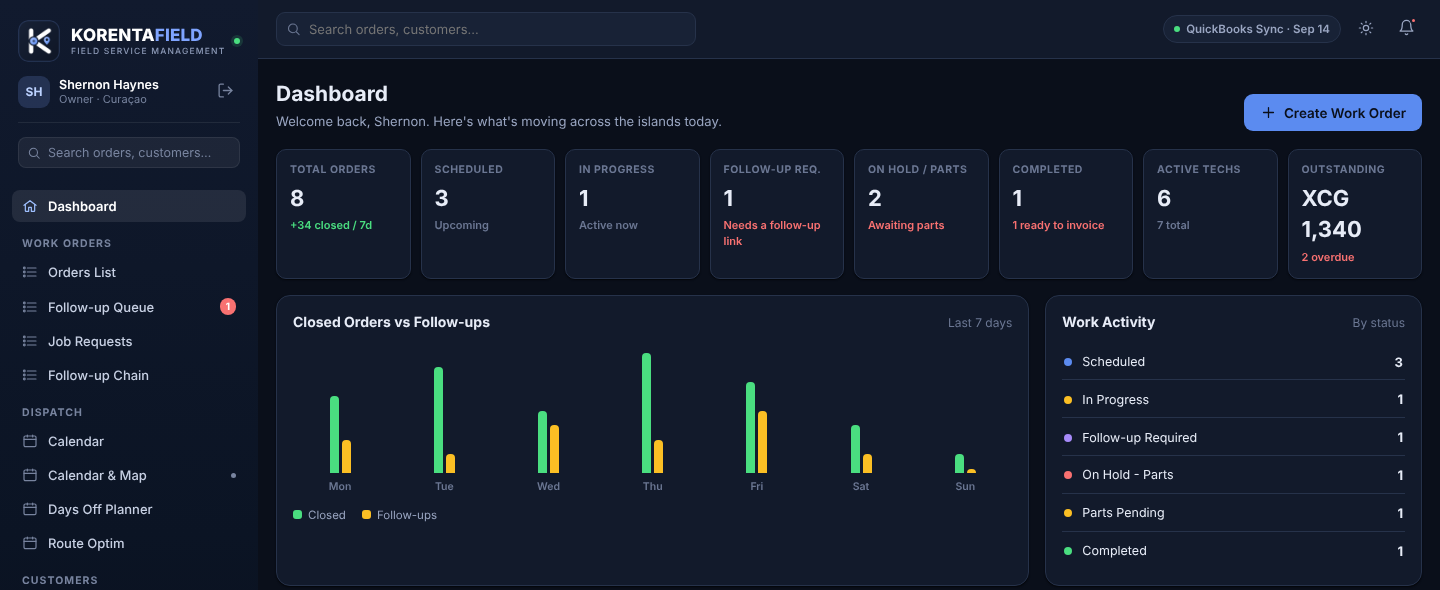
Everything a field crew touches in one day
From the moment a job is booked to the invoice that closes it, built around how technicians and dispatchers actually work across islands.
Scheduling & dispatch
A calendar with a map view, a days-off planner, and route stops grouped by day with one tap into Google Maps.
Follow-up Chain
Return visits stay linked to the original job, so a second trip is never scheduled twice or lost in the queue.
Work orders with proof
Start and end time, job photos and the customer's signature attach right to the work order.
Customers & equipment
Every machine stored with brand, model and serial, plus warranty and preventive-maintenance dates, linked to the jobs done on it.
Estimates to invoices
Send an estimate, convert it into a work order when approved, then invoice with a finance check before anything is sent on.
QuickBooks export Desktop today
Export invoices as an IIF file, per job or in batch, for QuickBooks Desktop. QuickBooks Online live sync is coming soon.
Roles that match your team
Owner, Administrator, Financial Admin, Dispatcher, Service Provider and Technician, each seeing exactly what their job needs.
Works on any phone
Runs in the browser on phone, tablet or PC and can be added to the home screen with its own icon. Nothing to install from an app store.
Requests, reports & time
Technicians can request a job from the field, the office accepts or declines it with a reason, and reports show where the week went.
From phone call to paid invoice in four steps
Book the job
The office creates the work order for the customer, island and machine, from a call, a request or an approved estimate.
Dispatch
Assign a technician on the calendar, check days off, and send the route to Google Maps.
Complete in the field
The technician logs start and end time, adds photos, collects the signature, and books a linked follow-up if another visit is needed.
Check & invoice
Finance checks the job, an invoice with its own number is created as a PDF, and it is exported to QuickBooks.
Six roles, so nobody sees more than they should
Everyone signs in with their own username and password. Only the Owner and the Administrator create or change users.
| Role | What they do |
|---|---|
| Owner | Full access to the company, team, settings, finance and reports. |
| Administrator | Your IT or office lead: manages users, settings and finance checks. |
| Financial Admin | Checks completed jobs, creates invoices and exports to QuickBooks. |
| Dispatcher | Creates and schedules work orders, manages customers and the calendar. |
| Service Provider | Works assigned jobs, requests new jobs, schedules follow-ups on their own jobs. |
| Technician | Field view: assigned jobs, time, photos, signature and job requests. |
Straightforward pricing, billed in USD
Every plan includes the finance-check workflow, PDF invoicing and multi-currency support. Start with a 14-day free trial with full access to every feature and no credit card, then choose the plan that fits your technician count.
Starter
For a solo operator or a single-island crew.
- Up to 3 technicians
- 1 island
- Scheduling & the Follow-up Chain
- PDF invoices with your logo
- Email support
Growth
For a dispatcher juggling more than one island.
- Up to 10 technicians
- Everything in Starter
- Multi-island dispatch & Route Optim
- Estimates to work-order conversion
- Equipment warranty & maintenance tracking
- QuickBooks Online sync Coming soon
Business
For an operation running the full fleet.
- Unlimited technicians
- Everything in Growth
- QuickBooks Desktop IIF export
- Time cards & payroll hours
- Onboarding call with our team

Travelling for work? Meet Korenta Tel.
Our Travel Expense Ledger keeps Cash and Visa spending for every trip apart, handles XCG and receipts, and exports to Excel for reconciliation.
Before you get in touch
The short answers. The assistant in the corner can go deeper on any of these.
What is Korenta Field, exactly?
A field service management app for companies running technicians across more than one Caribbean island: work orders, scheduling, follow-ups, invoicing and QuickBooks export in one place.
Which islands do you support?
Curaçao, Aruba, Bonaire, Sint Maarten and Antigua are built in. Your Owner, Administrator or Dispatcher can add other islands, such as Saba or Sint Eustatius. Each work order, customer and technician is tied to an island.
Does it connect to QuickBooks?
QuickBooks Desktop is supported today through an IIF file export, per job or in batch, which carries Korenta Field's invoice number. A live QuickBooks Online sync is coming soon and is not available yet.
What currency do you bill in?
Our plans are priced in USD. Inside the app, XCG is the book currency, and you can quote and invoice your own customers in XCG, USD or XCD; everything rolls up to XCG for totals and reports.
Is there a free trial?
Yes: 14 days, full access to every feature, no credit card. We set it up with you personally, so email us to start.
Can technicians use it on their phones?
Yes. It runs in any modern phone or tablet browser and can be added to the home screen, so a technician can close out a job from the field. It needs an internet connection today; offline use is not available yet.
Who can see my data?
Each company's data is kept separate from other companies, and every person signs in with their own account and role. Questions about security or where data is stored? Email us and we answer in writing.
What happens when the trial ends?
You choose a plan. Your data is kept. Until you choose, you can still read everything you entered, but new work orders, customers and invoices are paused.
Can I cancel or change plan?
Plans are billed monthly. Terms for cancelling and switching plans are agreed with you during onboarding, in writing.
Ready to move your team over?
Tell us your technician count and which islands you cover, and we set up your 14-day free trial personally.
- Full access, no credit card
- We create your company and your Owner login
- Your team gets invitations by email
- A real reply within one business day
Contact
We reply within one business day. We write in English, Dutch, Spanish and Papiamentu.
Based in Willemstad, Curaçao.
Already a customer? Sign in.